

Kneuma
Veteran Member
- 81
- 2025
- 33
TeleWoW
Control your WoW MoP server from your phone with Telegram
Control your WoW MoP server from your phone with Telegram
Ever wanted to control your server from your phone?
Ever wanted to get an instant alert when worldserver, authserver, or MySQL crashes?
That is exactly why I made TeleWoW.
TeleWoW is a Windows-first Python Telegram bot for EmuCoach / TrinityCore Mists of Pandaria repacks.
It gives you a clean Telegram control panel so you can monitor your machine, manage your server processes, run Remote Access commands, create accounts, and receive crash alerts directly on your phone.
GitHub
https://github.com/timoinglin/tele-wow
Preview
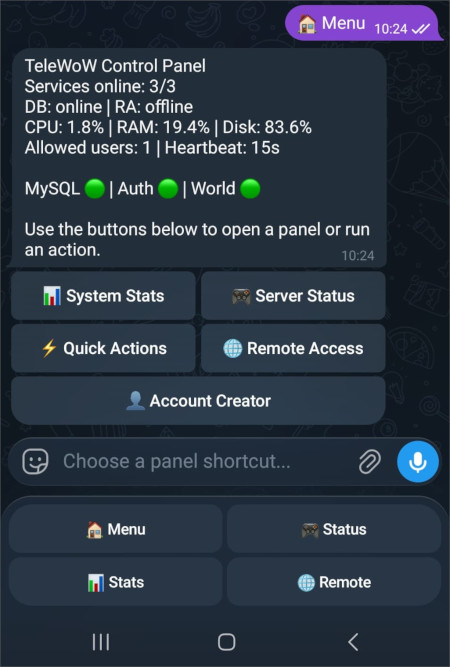
Main dashboard
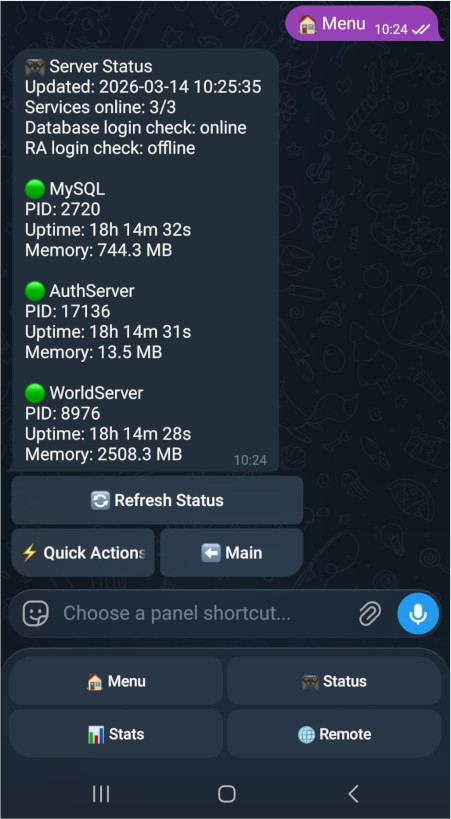
Server status
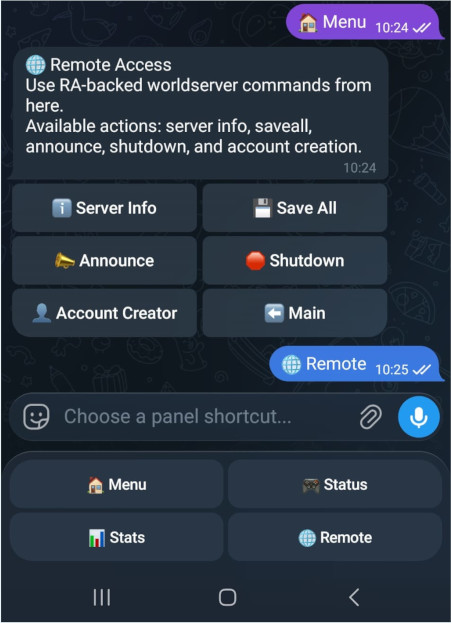
Remote actions
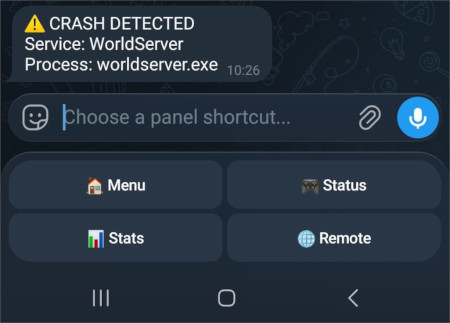
Crash alert example
What it can do
- Monitor mysqld.exe, authserver.exe, and worldserver.exe
- Send Telegram crash alerts when a tracked process stops unexpectedly
- Show CPU, RAM, disk usage, and host uptime
- Show server status with PID, uptime, and memory usage
- Start, stop, and restart MySQL, AuthServer, and WorldServer
- Run Remote Access actions from Telegram
- Create WoW accounts through worldserver RA
- Use confirmation dialogs for risky actions like stop, restart, shutdown, and account creation
- Protect access with a Telegram user ID whitelist
- Use a clean Telegram UI with inline menus and fixed navigation buttons
- Install quickly with a one-click installer
Main features
1. Telegram control panel
TeleWoW gives you a Telegram-based control panel so you can manage your server without sitting at your PC.
You can open panels for:
- System stats
- Server status
- Quick actions
- Remote Access
- Account creator
It also supports fixed navigation buttons for:
- Menu
- Status
- Stats
- Remote
2. Crash alerts
If one of the tracked server processes crashes, the bot can send an alert directly to your Telegram chat.
Tracked processes:
- MySQL
- AuthServer
- WorldServer
This makes it useful even when you are away from the PC and only have your phone.
3. Host stats and live status
The bot can display:
- CPU usage
- RAM usage
- Disk usage
- Host uptime
- Process state
- PID
- Per-process uptime
- Memory usage
4. Process control
Directly from Telegram you can:
- Start MySQL
- Stop MySQL
- Restart MySQL
- Start AuthServer
- Stop AuthServer
- Restart AuthServer
- Start WorldServer
- Stop WorldServer
- Restart WorldServer
The process control is aware of dependencies, so startup and restart behavior is handled more safely.
5. Remote Access commands
When RA is enabled in worldserver.conf, TeleWoW can run worldserver commands from Telegram.
Current built-in RA actions:
- Server Info
- Save All
- Announce
- Shutdown
For input-based actions like announcements and shutdown delay, the bot asks for the value in chat and then asks for confirmation before executing.
6. In-bot account creation
TeleWoW can create new WoW accounts through RA using the worldserver account command flow.
That means you can create accounts from your phone without manually hashing passwords in the database.
7. Whitelist protection
Only Telegram users whose numeric user IDs are listed in the config can use the bot.
This keeps the control features restricted to approved users only.
8. One-click installer
The project includes an easy Windows installer that:
- Checks that the repo is in the correct repack root location
- Checks whether Python 3.11+ is installed
- Installs Python with winget if needed
- Creates the virtual environment
- Installs requirements
- Creates the .env file from the example
After that, you only need to configure Telegram, fill in .env, enable RA if you want remote commands, and start the bot.
Requirements
- Windows
- A WoW MoP repack with Database and Repack folders
- Python 3.11+
- A Telegram bot token from BotFather
- One or more Telegram user IDs for the whitelist
Remote Access notes
RA features require:
- RA enabled in Repack\worldserver.conf
- A valid WoW account for RA login
- A high enough GM/security level for Ra.MinLevel
Typical required worldserver settings:
Code:
Ra.Enable = 1
Ra.IP = "127.0.0.1"
Ra.Port = 3443
Ra.MinLevel = 3
Install / Setup
Basic flow:
- Place the repo beside Database and Repack
- Run install_bot.bat
- Create your Telegram bot
- Fill in the values in .env
- Enable RA if you want remote commands
- Start the bot with start_bot.bat
Why I made this
The goal was simple:
phone-first control and phone-first alerts
Not everyone wants to remote into the machine just to check whether the server is alive, restart a process, create an account, or send an announcement.
TeleWoW keeps the common admin actions available in a simple Telegram interface.
Repository
https://github.com/timoinglin/tele-wow
If you try it, feedback is welcome.


 TeleWoW v1.0.0 — major update is live