
Hi everyone, I downloaded the new MOP 7.1 release and installed it on my public VPS.
I set up the server, but here is the problem: I can log in using the client, but I can't join the game server from a remote client.
If I run the client on the VPS itself, everything works fine.
Here are my configurations:

Worldserver.conf
RealmID = 1
DataDir = "."
LogsDir = ""
LoginDatabaseInfo = "127.0.0.1;3306;root;ascent;auth"
WorldDatabaseInfo = "127.0.0.1;3306;root;ascent;world"
CharacterDatabaseInfo = "127.0.0.1;3306;root;ascent;characters"
ArchiveDatabaseInfo = "127.0.0.1;3306;root;ascent;log"
LoginDatabase.WorkerThreads = 1
WorldDatabase.WorkerThreads = 1
CharacterDatabase.WorkerThreads = 4
ArchiveDatabase.WorkerThreads = 1
LoginDatabase.SynchThreads = 1
WorldDatabase.SynchThreads = 1
CharacterDatabase.SynchThreads = 8
ArchiveDatabase.SynchThreads = 1
MaxPingTime = 30
WorldServerPort = 8085
BindIP = "0.0.0.0"
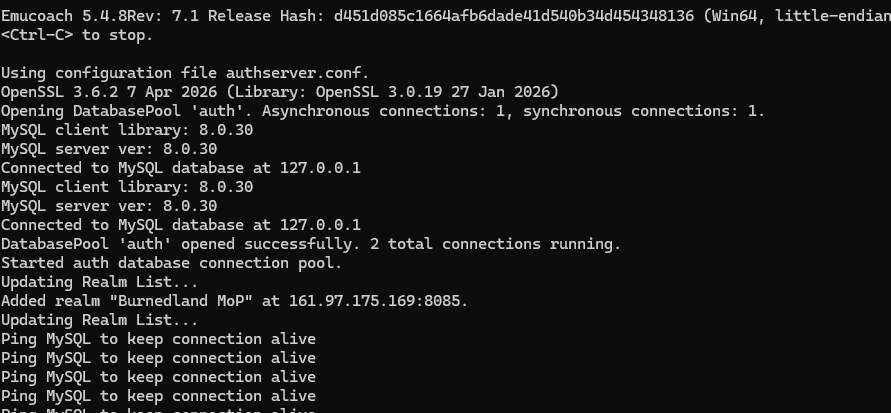
Authserver.exe
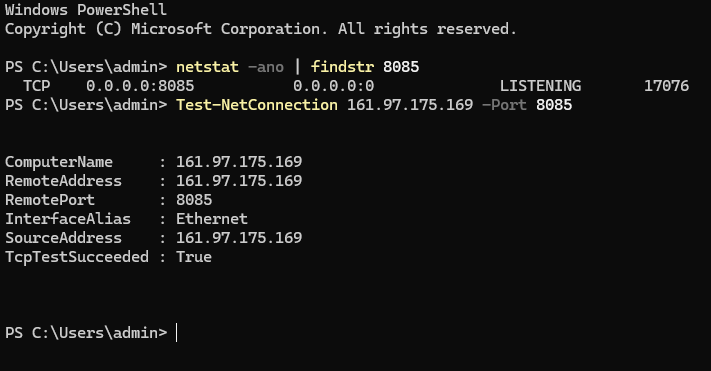
Powershell
I suspect the problem is an incorrect configuration, but I can't figure out which one. Any suggestions would be appreciated
thanks.
I set up the server, but here is the problem: I can log in using the client, but I can't join the game server from a remote client.
If I run the client on the VPS itself, everything works fine.
Here are my configurations:
Worldserver.conf
RealmID = 1
DataDir = "."
LogsDir = ""
LoginDatabaseInfo = "127.0.0.1;3306;root;ascent;auth"
WorldDatabaseInfo = "127.0.0.1;3306;root;ascent;world"
CharacterDatabaseInfo = "127.0.0.1;3306;root;ascent;characters"
ArchiveDatabaseInfo = "127.0.0.1;3306;root;ascent;log"
LoginDatabase.WorkerThreads = 1
WorldDatabase.WorkerThreads = 1
CharacterDatabase.WorkerThreads = 4
ArchiveDatabase.WorkerThreads = 1
LoginDatabase.SynchThreads = 1
WorldDatabase.SynchThreads = 1
CharacterDatabase.SynchThreads = 8
ArchiveDatabase.SynchThreads = 1
MaxPingTime = 30
WorldServerPort = 8085
BindIP = "0.0.0.0"
Authserver.exe
Powershell
I suspect the problem is an incorrect configuration, but I can't figure out which one. Any suggestions would be appreciated
thanks.

