What's new

Diablo 3 Diiis Server & Source 2025 - Akuma's Version

akumavenom

Gold Supporter
Silver Supporter
MoP Premium
Verified Member
18
2025
3
Source:

Pre-Compiled Server:

Client:

Client Mirror:

I have been working on the server implementation for Diablo 3 Diiis, Picking up where the community fork left it 2 months ago.
The currently supported version of the client: 2.7.4.84161

Act 1 is fully playable from start to end with no quest soft locking issues, All other Acts are untested at the moment.

Implemented Custom Feature: Optional Diablo 4 Season 3 style Blood Build Necromancer mechanics to Blood Siphon & Death Nova Skills.

The following changed have been made to the source so far:

Fix monster damage, targeting effectiveness, and difficulty scaling

Fix infinite loading screen caused by invalid portal world transitions

Fix Necromancer corpse spawning for Corpse Explosion

Fix Maghda boss AI to properly attack and boss summon mobs

Optimize packet compression using .NET ZLibStream

Improve server performance by eliminating busy-waiting and thread pool contention

Added a polished special optional D4 Season 3–style Blood Necromancer mechanics to Blood Siphon

Start server process with High priority by default

Added optional BloodBuild D4 Season 3–style Blood Nova mechanics to Death Nova Skill


530220516-f74ed1f0-a225-4a6c-8738-64ae7a9e3e7a.png
 
Last edited:
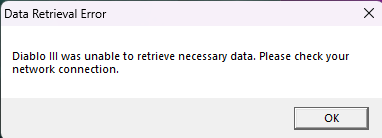
I don't know if I'm wrong, but it should work without internet? Because the client always throws an error message when I try without internet. I heard that it should work without internet. I'm curious about your opinion on this, or maybe any ideas on what I'm doing wrong.
 

Attachments

  • image_2025-12-28_223506264.png
    image_2025-12-28_223506264.png
    4.3 KB · Views: 12
I don't know if I'm wrong, but it should work without internet? Because the client always throws an error message when I try without internet. I heard that it should work without internet. I'm curious about your opinion on this, or maybe any ideas on what I'm doing wrong.
Setting up redirects client to your server:


Method - Edit Hosts File


Add redirects to the hosts file (Windows - %WinDir%\System32\drivers\etc\hosts, Linux - /etc/hosts):
127.0.0.1 us.actual.battle.net
127.0.0.1 eu.actual.battle.net

The Diablo III Client exe "Diablo III64.exe" must be started using the -launch parameter when using a shortcut of the exe to start the game.


What “internet” actually means for D3​


Diablo III was built as an always-online client/server game. That means:


  • The client mustconnect to:
    • a Battle.net-style auth server
    • a game service endpoint
  • It doesn’t careif this is:
    • real Blizzard servers ❌
    • or your own server on LAN / localhost ✅

So the requirement is network connectivity, not public internet.


Works on LAN / localhost ✅


You can run everything offline from the real internet if:


  • Client PC and server PC can see each other on LAN
    (or same machine via 127.0.0.1)
  • DNS / hosts file points Blizzard domains to your server

Typical setup:


127.0.0.1 us.actual.battle.net
127.0.0.1 eu.actual.battle.net

In this case:

  • No external internet required
  • No Blizzard servers contacted
  • Entirely self-contained

What happens if there is NO network at all ❌


If you disconnect networking entirely (no LAN, no loopback):


  • D3 client will not start
  • Login/auth handshake fails
  • Game never reaches character select

Blizzard never released a true offline D3 mode — it’s baked into the architecture.
 
Last edited:
Setting up redirects client to your server:


Method - Edit Hosts File


Add redirects to the hosts file (Windows - %WinDir%\System32\drivers\etc\hosts, Linux - /etc/hosts):
127.0.0.1 us.actual.battle.net
127.0.0.1 eu.actual.battle.net

The Diablo III Client exe "Diablo III64.exe" must be started using the -launch parameter when using a shortcut of the exe to start the game.


What “internet” actually means for D3​


Diablo III was built as an always-online client/server game. That means:


  • The client mustconnect to:
    • a Battle.net-style auth server
    • a game service endpoint
  • It doesn’t careif this is:
    • real Blizzard servers ❌
    • or your own server on LAN / localhost ✅

So the requirement is network connectivity, not public internet.


Works on LAN / localhost ✅


You can run everything offline from the real internet if:


  • Client PC and server PC can see each other on LAN
    (or same machine via 127.0.0.1)
  • DNS / hosts file points Blizzard domains to your server

Typical setup:


127.0.0.1 us.actual.battle.net
127.0.0.1 eu.actual.battle.net

In this case:

  • No external internet required
  • No Blizzard servers contacted
  • Entirely self-contained

What happens if there is NO network at all ❌


If you disconnect networking entirely (no LAN, no loopback):


  • D3 client will not start
  • Login/auth handshake fails
  • Game never reaches character select

Blizzard never released a true offline D3 mode — it’s baked into the architecture.
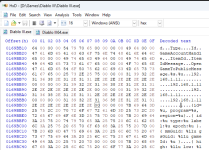
I did everything here, but the client throws the error even if I resize the client's window. I tried the original latest client, and that didn't throw any error at all even without internet. I know i can't connect to the server with that, because of the version difference. Does this mean there is a problem with the client, or I still messing something up? Sorry for my dumbness but I really want this to work. Thank you in advance for your help!
 
Back
Top