Is there another way of downloading this file, Mega does not work in Russia? Thank you for the hard work you all put into all this stuff.Download Server v7.20.0 FULL

-
NEW: Happy Cataclysm gaming! The fresh 4.3.4 Cataclysm Repack V20.0 is now live - and downloadable from our brand-new Emucoach App.
Download it now -
Mists of Pandaria is calling! Heya - did you know that the newest 5.4.8 MoP Repack - version 7.1 - is now live?
Download now
You are using an out of date browser. It may not display this or other websites correctly.
You should upgrade or use an alternative browser.
You should upgrade or use an alternative browser.
[RELEASE] [7.3.5] SPPNXT LEGION - PlayerBot/PartyBot Wanderers - Solo/Bot LFGs
- Thread starter akumavenom
- Start date

- 67
- 2025
- 27
v8.0.0 Major Update Released!
Recruit any Playerbot Wanderer you meet and adventure across Azeroth together.
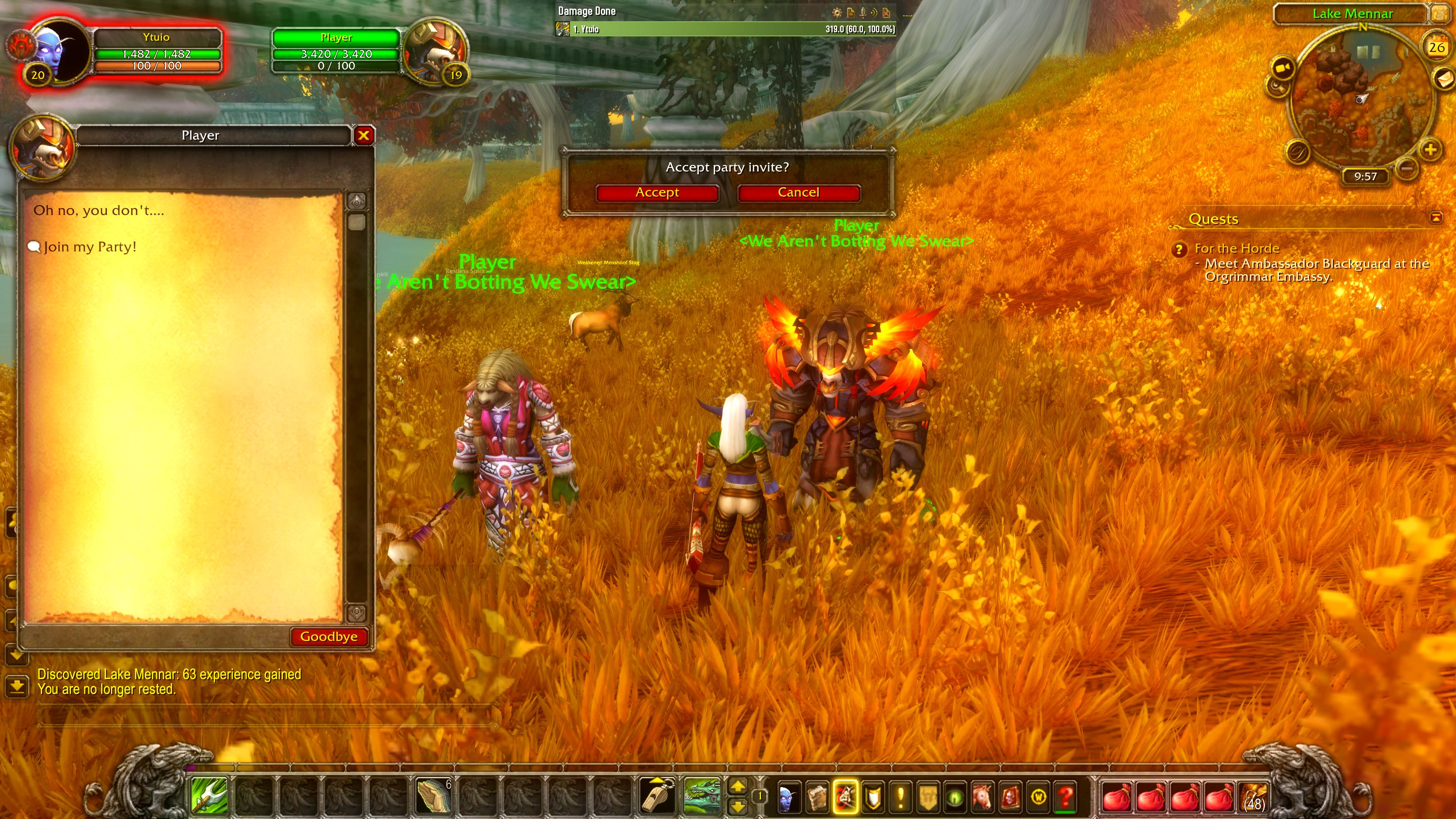
Recruit any Playerbot Wanderer you meet and adventure across Azeroth together.
- You can now recruit Playerbot Wanderers into your party directly from the world.
- Any Playerbot Wanderer you encounter during your adventures can now join your group and become your companion.
- Recruited Partybot Wanderers will follow you across Azeroth, fight by your side, cast spells, use class abilities, and assist you in combat just like a real party member.
- Build your own adventuring party by recruiting the wanderers you meet throughout the world, making group questing & exploration feel more like a true MMORPG experience.
- Every journey is now unique, as you can create different party compositions from the thousands of Playerbot Wanderers roaming the world.
Last edited:

Darner
Verified Member
- 12
- 2026
- 2
This may sound like a dumb question, but is this a full repack including server files? how would you go about setting it up? Similar to the trinity core or much easier to install? Also, does it work with actual proper multiplayer, or single player only? That said, this looks incredible! I'd love to try it out.
- 67
- 2025
- 27
to get the full server with data files download either MEGA Download Server v8.0.0 FULL or Google Drive Download Server v8.0.0 FULL:This may sound like a dumb question, but is this a full repack including server files? how would you go about setting it up? Similar to the trinity core or much easier to install? Also, does it work with actual proper multiplayer, or single player only? That said, this looks incredible! I'd love to try it out.
if you are using the same pc with server and client then its pretty much set up strait away, just enter 127.0.0.1 as your clients config.wtf portal and you can log in with "User: adm@adm password: adm".
proper multiplayer works fine i use to run a online server of this repack but you will need to set up a webpage for account creation
Darner
Verified Member
- 12
- 2026
- 2
Me and some friends are struggling trying to set up a multiplayer through the night with your provided mega link. We've hit... a lot of trouble. Would we be able to pull you into discord to help? Every thing we've tried to get one of our friends clients to connect just keeps giving an immediate 'disconnected' error with no server ping. My name on discord is same as here.to get the full server with data files download either MEGA Download Server v8.0.0 FULL or Google Drive Download Server v8.0.0 FULL:
if you are using the same pc with server and client then its pretty much set up strait away, just enter 127.0.0.1 as your clients config.wtf portal and you can log in with "User: adm@adm password: adm".
proper multiplayer works fine i use to run a online server of this repack but you will need to set up a webpage for account creation
Last edited:
- 67
- 2025
- 27
sorry but i will not join discord, the disconnect issue may be because the battle account id is not set in the regular account.
![help1-[RaGEZONE].webp](https://www.emucoach.com/attachments/help1-ragezone-webp.5492/ "help1-[RaGEZONE].webp")
![help2-[RaGEZONE].webp](https://www.emucoach.com/attachments/help2-ragezone-webp.5493/ "help2-[RaGEZONE].webp")
Darner
Verified Member
- 12
- 2026
- 2
That's understandable that you won't join the discord to help us out, but i appreciate the help you have provided thus far. I'm not great at describing the issues we've been having, but suffice to say that there have been...quite a lot. Right now we're thinking it might be a client mismatch, so we're downloading the client listed in your own first post as well to try that to see if *that* will work. In worst case scenario, we might have to start over from scratch in trying to set it up, making sure it works locally before trying to edit it again to try and get it to accept external connections. We've had a massive amount of issues and we're completely lost on the variety of what it could be. We tried editing the realmlist of the server and a ton of other things using the knowledge we brought over from setting up 3.3.5 server's but it's probably only served to deepen our problems lol. Still, we're gonna keep trying cause the only part we *can't* get working so far for the server is actually being able to log in and *play*. We've gotten the .bat's to work after figuring out we were missing a c++ distributable and some other things.sorry but i will not join discord, the disconnect issue may be because the battle account id is not set in the regular account.View attachment 5492View attachment 5493
Edit:
Can verify the problem is *not* a battlenet account id issue, as the account has a proper set ID. Further, the battlenet server bat shows no response or even attempt to ping the server was made when the client gives its instant disconnect error.
Edit 2: We got it working!! Somewhat! We're able to make a character at least, have not verified actual loading in yet, but this is still sign in and char creation, which probably means we're good to go!
Edit 3: We've hit..yet another snag.
OTL
Now the issue is, the game never properly loads in a character, it stops dead at 90% load then returns a 'world server down' error, even though the world server was, in fact, very much still up and running fine.
Attachments
Last edited:
- 67
- 2025
- 27
sounds like the world port is not open on your router but im not sure really what the problem could be.
all the TCP ports to open: 8085, 8086, 8081, 1118, 1119
v8.0.3 Minor Bug Fix Update
- Fixed the invited party playerbots so they do not pull mobs from such a far distance, instead the invited bot will attack enemies within a very very short range, its a intended controlled way to get them to attack certain enemies that the player wants by running very close to the enemy with your bot to make them attack it.
- Fixed an issue with the playerbots melee ability not being cast properly, melee bots will now use "bladestorm" & "Crush" as intended.
I am thinking about adding optional partybot wanderers standing on the inside entrance of dungeons so players can do dungeons with those bots if they wish.
all the TCP ports to open: 8085, 8086, 8081, 1118, 1119
v8.0.3 Minor Bug Fix Update
- Fixed the invited party playerbots so they do not pull mobs from such a far distance, instead the invited bot will attack enemies within a very very short range, its a intended controlled way to get them to attack certain enemies that the player wants by running very close to the enemy with your bot to make them attack it.
- Fixed an issue with the playerbots melee ability not being cast properly, melee bots will now use "bladestorm" & "Crush" as intended.
I am thinking about adding optional partybot wanderers standing on the inside entrance of dungeons so players can do dungeons with those bots if they wish.
Last edited:
Darner
Verified Member
- 12
- 2026
- 2
We have all five of those open on the server side. do you mean we should open them on the client side too?sounds like the world port is not open on your router but im not sure really what the problem could be.
all the TCP ports to open: 8085, 8086, 8081, 1118, 1119
v8.0.3 Minor Bug Fix Update
- Fixed the invited party playerbots so they do not pull mobs from such a far distance, instead the invited bot will attack enemies within a very very short range, its a intended controlled way to get them to attack certain enemies that the player wants by running very close to the enemy with your bot to make them attack it.
- Fixed an issue with the playerbots melee ability not being cast properly, melee bots will now use "bladestorm" & "Crush" as intended.
I am thinking about adding optional partybot wanderers standing on the inside entrance of dungeons so players can do dungeons with those bots if they wish.
- 67
- 2025
- 27
no the client side does not need themWe have all five of those open on the server side. do you mean we should open them on the client side too?
Darner
Verified Member
- 12
- 2026
- 2
I'm thinking of trying to restart from scratch on this thing again, to see if we possibly messed up some of the code or what not. We had to mess around with a lot when trying to get the auth into the SQL so that we could edit the realm list, since for some reason or other heidi didnt read it at first.no the client side does not need them
In the case i do that, if you were setting up a server again for multiplayer from the repack, what would be your flow chart?
Download file --> extract --> move to C:/ drive(the .bat's couldnt find their required files in it until we had moved it to the root) --> run first .bat. make the friends and own account --> --> ???(don't remember how we got the sql to open the auth to edit it at this point i'm stumped.)
Darner
Verified Member
- 12
- 2026
- 2
okay we got it to the point people outside the network can connect. but it doesn't work for people inside the network of the server. because it needs bound to 127.0.0.1I'm thinking of trying to restart from scratch on this thing again, to see if we possibly messed up some of the code or what not. We had to mess around with a lot when trying to get the auth into the SQL so that we could edit the realm list, since for some reason or other heidi didnt read it at first.
In the case i do that, if you were setting up a server again for multiplayer from the repack, what would be your flow chart?
Download file --> extract --> move to C:/ drive(the .bat's couldnt find their required files in it until we had moved it to the root) --> run first .bat. make the friends and own account --> --> ???(don't remember how we got the sql to open the auth to edit it at this point i'm stumped.)
Minendrache
Veteran Member
- 48
- 2025
- 6
just use the external ip for the people inside your network ?
Darner
Verified Member
- 12
- 2026
- 2
just use the external ip for the people inside your network ?
We got it working a bit before you answered, but thank you for that suggestion. we had to do a bit of grunt work but we do have it working in multiplayer!
- 67
- 2025
- 27
v8.1.6
- Changed dialogue for AkumaVenom when he gives a buff to the player
- Changed dialogue for npcs when AkumaVenom gives a buff to the them.
===========================================================
v8.1.5
- Fixed playerbots to eventually return to their original spawn points if they are not in a party with the player.
===========================================================
v8.1.4
- QoL for The AkumaVenom NPC in Goldshire & Orgrimmar, He now gives buffs of 5% increased stamina to players and other npcs like playerbot wanderers when close to him, the buff giving loop runs on a 15 second delay so its not spammed, he also talks with a speech bubble over his head when giving buffs and also now has a gossip chat menu.
===========================================================
v8.1.0
- Added 240 new horde goblin playerbot/partybot wanderers into the goblin starting zone Kezan.
- Added 400 new horde goblin playerbot/partybot wanderers into the goblin starting zone The Lost Isles.
- Changed dialogue for AkumaVenom when he gives a buff to the player
- Changed dialogue for npcs when AkumaVenom gives a buff to the them.
===========================================================
v8.1.5
- Fixed playerbots to eventually return to their original spawn points if they are not in a party with the player.
===========================================================
v8.1.4
- QoL for The AkumaVenom NPC in Goldshire & Orgrimmar, He now gives buffs of 5% increased stamina to players and other npcs like playerbot wanderers when close to him, the buff giving loop runs on a 15 second delay so its not spammed, he also talks with a speech bubble over his head when giving buffs and also now has a gossip chat menu.
===========================================================
v8.1.0
- Added 240 new horde goblin playerbot/partybot wanderers into the goblin starting zone Kezan.
- Added 400 new horde goblin playerbot/partybot wanderers into the goblin starting zone The Lost Isles.
Last edited:
Hello, I am really enjoying this repack however I noticed Warrior Bots seem to insta kill mobs with Crush. I am using 8.0.3 version of repack so I don't know if later versions fixed this but other than that I didn't notice any other serious issues.
Thank you for your hard work and quick updates!
Edit: Seems like insta kill affects only some of the mobs. For example boars, fleshrippers, gnolls, murlocks get insta killed but harvest golems and defias don't.
Thank you for your hard work and quick updates!
Edit: Seems like insta kill affects only some of the mobs. For example boars, fleshrippers, gnolls, murlocks get insta killed but harvest golems and defias don't.
Last edited:
- 67
- 2025
- 27
v8.1.7
- Increased health of all playerbots and lowered their damage a bit.
- Playerbots now have a chance to drink Health Potions in battle.
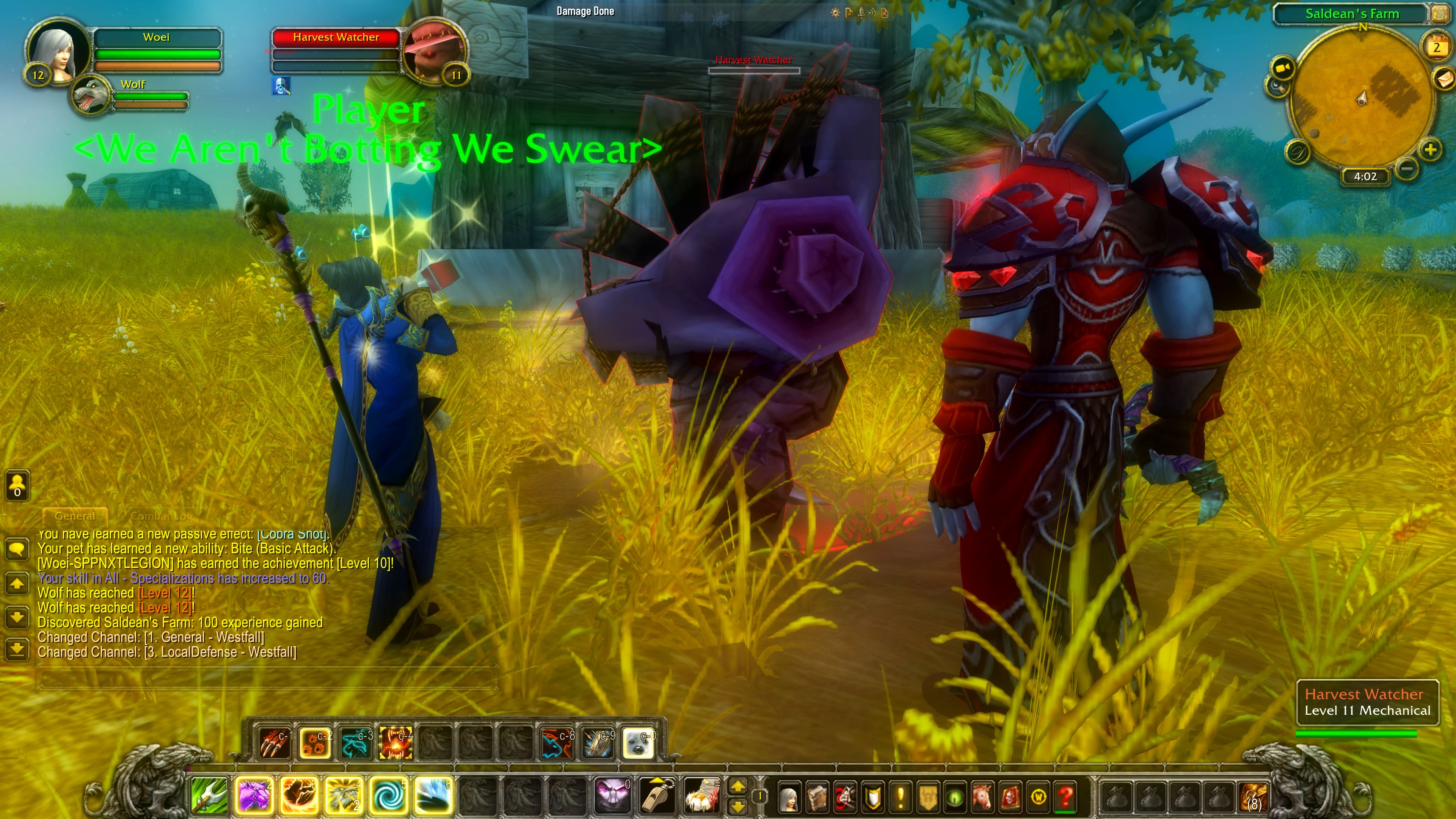
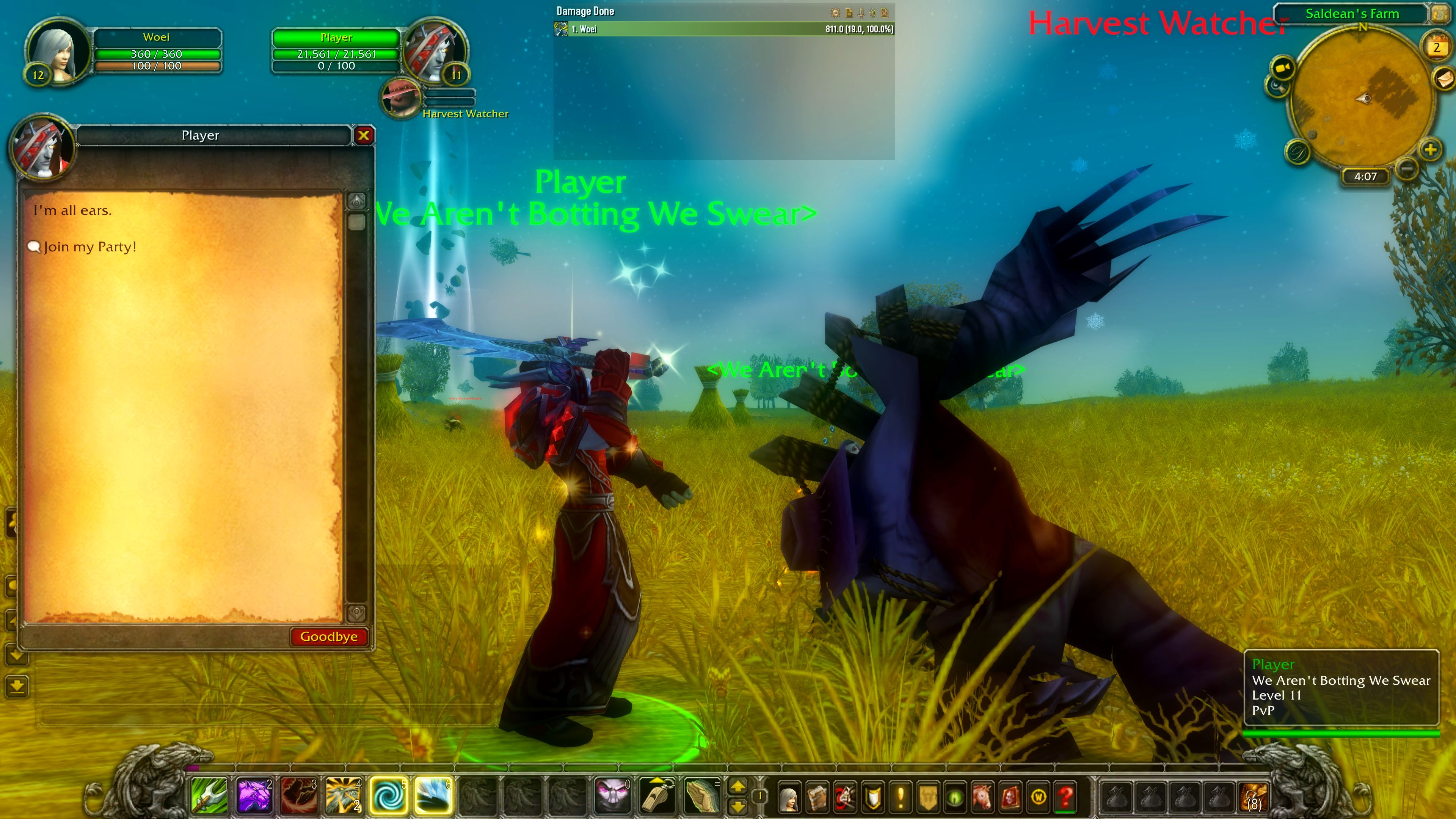
- Increased health of all playerbots and lowered their damage a bit.
- Playerbots now have a chance to drink Health Potions in battle.